Roger job page: chat first
Three layouts of the same idea. Opening a job lands on the chat; the newest item is at the bottom. Tabs: Chat, to-dos, questions, info. Real data from jobs #875, #873 and #846.
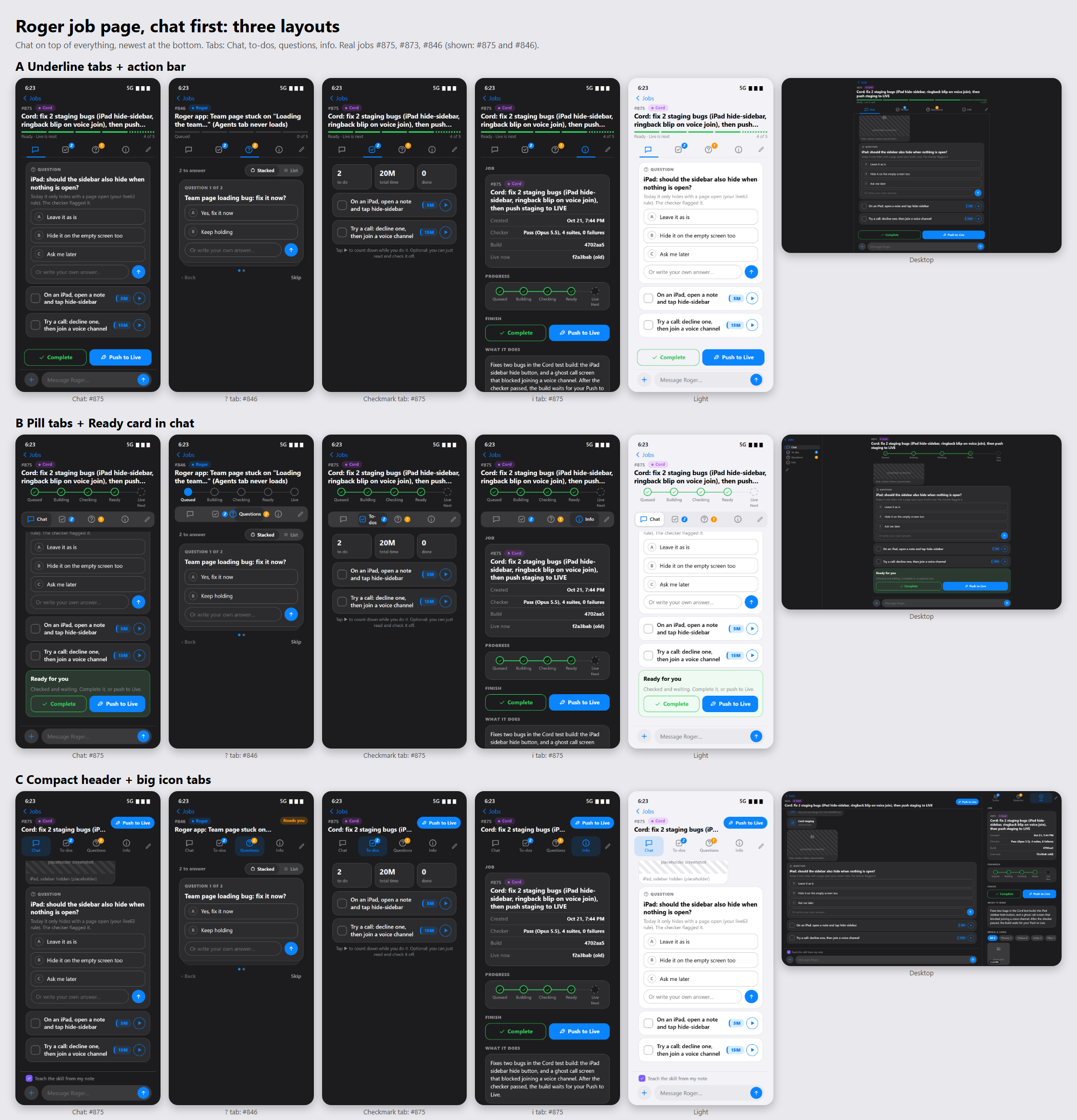
Try on your phone: swipe left and right to change tabs. Tap the pencil (or press and hold the tab bar) to drag the tabs into a new order. Tap ▶ on a to-do to count down. Answer a question right in the chat. On the ? tab flip Stacked / List. On the i tab open Media & links and tap one to jump to it in the chat. Use the top bar to switch job (#875, #873, #846), dark or light, phone or desktop.
AUnderline tabs, action bar
- Icon tabs with an underline, pencil at the end to rearrange.
- Progress is one thin five-part bar under the title.
- Complete / Push to Live: a bar pinned just above the message box (only when the job is Ready), and again in Info.
- Desktop: one centered column.
BPill tabs, Ready card in the chat
- Pill tab bar with counts; the open tab shows its name.
- Progress is the five circles from design E, at the top.
- Complete / Push to Live: a "Ready for you" card as the newest item at the bottom of the chat, and again in Info.
- Desktop: tabs become a left rail.
CCompact header, big icon tabs
- One-line title; big icons with a small label under each tab.
- No progress row on top (it lives in Info); a status pill shows the stage.
- Complete / Push to Live: one blue "Push to Live" button in the header opens a small sheet with both choices, and again in Info.
- "Teach the skill" tick sits above the message box.
- Desktop: chat on the left, the other tabs on the right.
Placeholders: the iPad screenshot on #875, the second question on #846, the checker/time lines are made up or paraphrased from the real job notes. The titles, projects, stages, #846's first question and the #873/#846 screenshots are real. Send, the pickers and the Jobs back button do nothing here.
Mockup only. Nothing here touches the real app.